Palette Lab article
What is HSB color? A quick guide for Palette Lab players
Learn the HSB color model, hue, saturation, brightness, and the practical differences between HSB, HSV, HSL, RGB, and HEX.
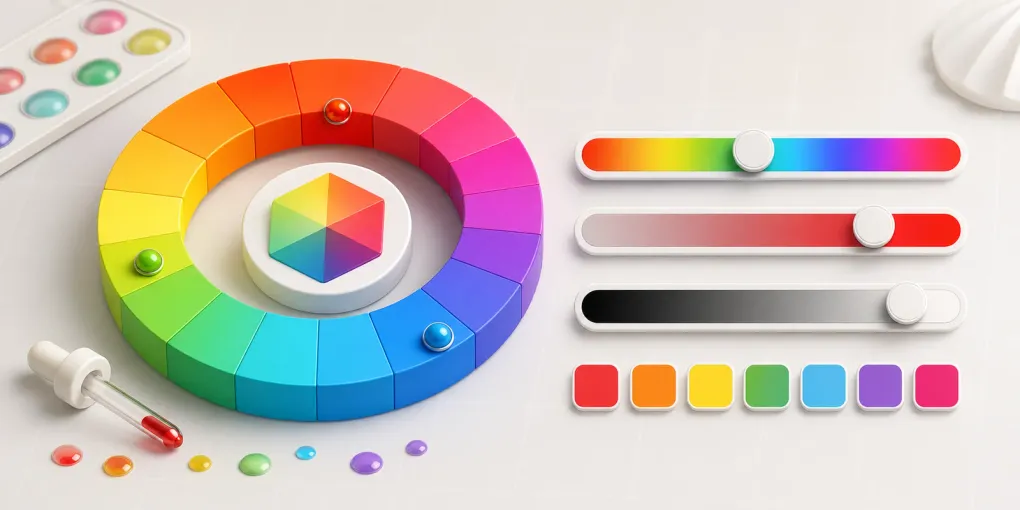
HSB color is a way to describe color with Hue, Saturation, and Brightness. It is practical because it separates three questions your eye already asks: what color family is it, how intense is it, and how light does it feel?
That is why Palette Lab uses HSB in Toon Tone. Guessing a raw HEX code is not how most people remember color. Moving hue, saturation, and brightness sliders feels closer to the way designers and artists adjust color in real tools.
If you searched for “what is HSB color”, “HSB vs HSV”, “HSB vs HSL”, or “hue saturation brightness”, the short answer is this: HSB is a color model that helps you choose and adjust colors by visual qualities instead of raw red, green, and blue channel values.
What does the HSB color model mean?
The HSB color model describes a color with three values:
- H: Hue, usually an angle from 0 to 360 degrees.
- S: Saturation, usually a percentage from 0% to 100%.
- B: Brightness, usually a percentage from 0% to 100%.
For example, a vivid bright blue has a hue near the blue region, high saturation, and high brightness. A gray-blue can still have a blue hue, but with much lower saturation. A dark blue can keep a similar hue while using lower brightness.
That is the main advantage of HSB: you do not have to think first in red, green, and blue channels. You can move toward the target color in the same order your eye tends to notice it.
HSB color starts with hue
Hue is the color family on the wheel. Red, yellow, green, cyan, blue, and magenta are hue decisions.
When a Toon Tone guess feels completely wrong, hue is usually the first thing to check. A color can be perfectly bright and saturated, but if the hue is too blue instead of cyan, the whole answer feels off.
On a typical color wheel, hue is measured as an angle. 0 degrees and 360 degrees return to red, with yellow, green, cyan, blue, and magenta arranged around the circle. When you drag the hue slider in a color picker, you are moving around that wheel.
In practice, start by asking: does this color lean red, orange, yellow, green, cyan, blue, or purple? If the hue is wrong, saturation and brightness tweaks will not rescue the color.
HSB color depends on saturation
Saturation describes how vivid or muted a color is. A highly saturated orange feels loud; a low-saturation orange can feel beige, brown, or gray.
In a color palette extractor, saturation helps explain why two colors with similar hue can behave differently in a UI. One may work as a call-to-action color, while the other is better as a background accent.
As saturation decreases, a color moves away from a pure, vivid feeling and becomes softer, grayer, or more neutral. Many brand palettes, illustration shadows, and UI background colors are not made by lowering brightness alone. They also reduce saturation so the color feels less harsh.
If you want a softer color, do not only increase brightness. A better first move is often to keep the hue roughly stable, lower saturation, and then adjust brightness.
HSB color depends on brightness
Brightness describes how much light appears in the color. In practice, brightness mistakes are common because memory often stores a color family more clearly than its exact lightness.
If you want better Toon Tone scores, slow down near the end of a round and adjust brightness separately from hue.
In HSB, brightness near 0% pushes the color toward black. Higher brightness creates a lighter version of the current hue and saturation. It is useful for questions like: is this blue bright, medium, or dark? Is this red a vivid red or a deeper burgundy?
Are HSB and HSV the same?
In most design and programming contexts, HSB and HSV refer to the same color model. HSV stands for Hue, Saturation, Value; HSB stands for Hue, Saturation, Brightness. Value and brightness are usually two names for the same third channel.
You will often see these related terms:
- HSB: Hue, Saturation, Brightness
- HSV: Hue, Saturation, Value
- HSBA: HSB plus alpha transparency
- HSVA: HSV plus alpha transparency
The concept is usually the same, but software can differ in naming, value ranges, and rounding. One tool may show hue as 0-360, while a programming API may normalize hue, saturation, and brightness to 0-1. Check the expected format before copying numbers between tools.
What is the difference between HSB and HSL?
HSB and HSL are easy to confuse because both start with hue and saturation, and both feel more human-readable than RGB. The difference is the third channel:
- HSB uses Brightness, which is tied to the maximum channel value in the model.
- HSL uses Lightness, which is a more symmetrical position between black and white.
In practical terms:
- Use HSB or HSV when you want a designer-friendly color picker for quickly finding and adjusting a color.
- Use HSL when you are writing CSS
hsl()values or making simple lightness variations in a stylesheet. - Use OKLCH when you need a more perceptual way to reason about lightness, chroma, and hue.
A common mistake is assuming HSB brightness and HSL lightness are interchangeable. They are not. Two colors can look similar while having different HSB and HSL third-channel values, and matching the third channel alone does not guarantee equal perceived lightness.
HSB, RGB, and HEX: when should you use each?
HSB, RGB, and HEX are different ways to describe the same color, not competing goals.
RGB describes color with red, green, and blue channels. It is useful for screens, Canvas, image processing, and JavaScript color math. HEX is a compact hexadecimal version of RGB, such as #4F8CFF, and is common in CSS, design specs, and brand guidelines. HSB is better for choosing, adjusting, and learning color because it gives you direct control over hue, saturation, and brightness.
For web work, a common flow is: use HSB or HSL to find the visual color you want, then copy the result as HEX, RGB, CSS variables, or JSON for the actual project.
How do you adjust color with HSB?
A useful order is:
- Set hue first: choose the color family, such as orange, blue, or green.
- Set saturation next: decide whether the color is vivid, muted, grayish, or nearly pure.
- Set brightness last: decide whether the color is light, medium, or dark.
If the color direction feels wrong, adjust hue. If the color feels too dull or too loud, adjust saturation. If it feels too heavy or too pale, adjust brightness.
This order is also useful in UI design. When you need hover colors, soft backgrounds, or emphasis colors based on a brand color, keeping the hue stable while adjusting saturation and brightness is usually more controlled than picking random HEX values.
Use HSB color with Palette Lab
Use Toon Tone when you want to train color memory. Use the Palette Lab color palette extractor when you want to turn an image into reusable HEX, RGB, HSB, OKLCH, CSS variables, and JSON.
Together, the game and the tool make HSB color less abstract: you can guess a color, compare it, extract real palettes, and keep practicing.
More specifically:
- Use Toon Tone to practice rebuilding a missing color with HSB sliders.
- Use the color palette extractor to inspect real image colors and compare their HEX, RGB, HSB, and OKLCH values.
- Copy extracted colors as CSS variables or JSON for websites, prototypes, design systems, or browser games.
HSB color FAQ
Can I use HSB in CSS?
CSS commonly uses HEX, RGB, HSL, OKLCH, and related color functions. HSB itself is not the most common native CSS notation, but it is still useful as a color-picking and learning model. You can choose a color in HSB, then convert it to HEX, RGB, HSL, or OKLCH for CSS.
Is HSB brightness the same as perceived brightness?
Not exactly. HSB brightness is a channel in the color model, not a full measurement of how bright a color feels to human vision. Different hues can appear differently bright even when they share the same HSB brightness. For readability, contrast, and accessibility, do not rely on HSB brightness alone.
Why can two similar HSB values look different?
Small hue changes can matter a lot in some regions of the color wheel, and saturation plus brightness can change a color’s role. A high-saturation bright yellow feels very loud, while a low-saturation bright yellow can feel like a soft background. Color depends on the surrounding palette, not only one number.
Why learn HSB for design or art?
HSB helps you diagnose color problems quickly. Instead of saying “this color is wrong”, you can tell whether the hue is off, the saturation is too high, or the brightness is too low. That makes it useful for UI design, illustration, brand palettes, and Palette Lab color practice.